Part 1 - Introduction
In the name of Allah, the Most Gracious, the Most Merciful.
Introduction 💭
angr is an open source symbolic execution engine that lets you analyze and emulate binary programs. It uses symbolic execution to explore all possible execution branches of a program. Among other things, it can be used to discover vulnerabilities, bugs, and the conditions needed to reach certain parts of a program.
One of angr’s main advantages is its ability to analyze programs without needing to actually run them. This helps avoid security issues, for example with malware, and makes it easier to analyze a piece of code without having to execute it.
angr is used in many areas of computer security, such as bug hunting, malware analysis, embedded systems security, and challenges!
It is compatible with many processor architectures and supports many binary file formats.
The different types of analysis
Before looking directly at symbolic execution, let’s first see the two main methods used to analyze a program.
The program used as an example is the following:
1
2
3
4
5
6
7
8
9
10
11
12
13
14
15
16
#include <stdlib.h>

int main(int argc, char *argv[])
{
    int arg = atoi(argv[1]);

    if (arg == 0xdeadbeef)
    {
        return 1337;
    }
    else
    {
        return -1;
    }
}
Static analysis
This type of analysis is called “static” because it does not require executing the program. Generally, we use tools that extract information from a program and help us understand it.
We can use a disassembler to convert raw byte data into assembly instructions, for example: objdump, radare2, capstone.
Example of the previous code disassembled after compilation:
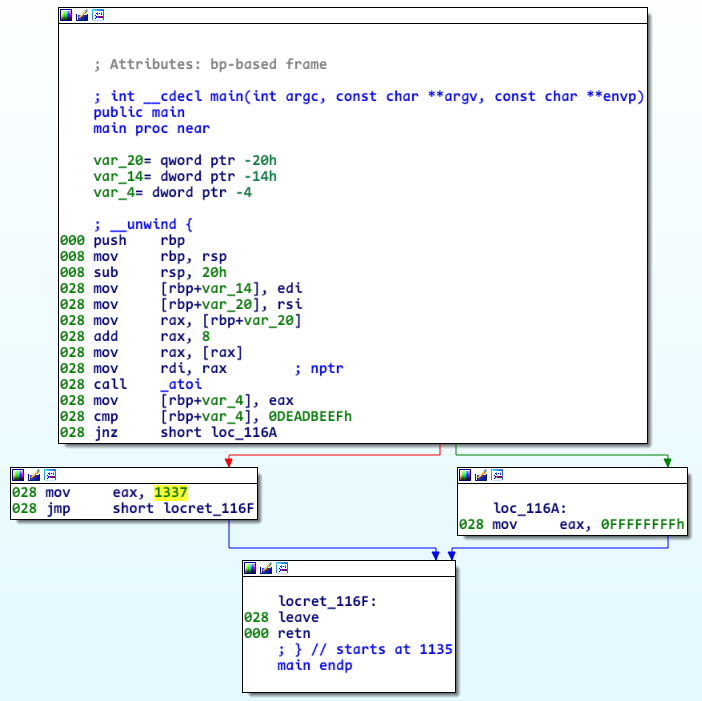
We also use decompilers to get additional information, such as code that is easier for a human to read. Examples include: Ida Pro, Ghidra, Binary Ninja, Cutter …
Example of the previous code decompiled:
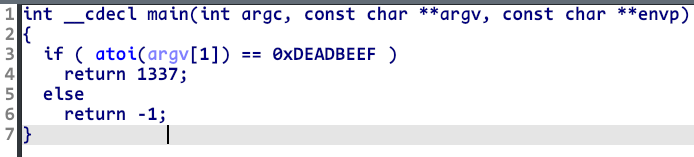
By using these various tools, it is often already possible to understand what a program does, how its different functions are called, and how they interact with each other.
Dynamic analysis
Unlike static analysis, dynamic analysis requires executing the program. This execution can be performed on a physical machine, an emulator, for example Qemu, a virtual machine, and so on.
Various tools, called debuggers, allow us to perform dynamic analysis by executing a program step by step. For example: GDB, windbg, x64dbg …
Example of executing the main function in GDB:
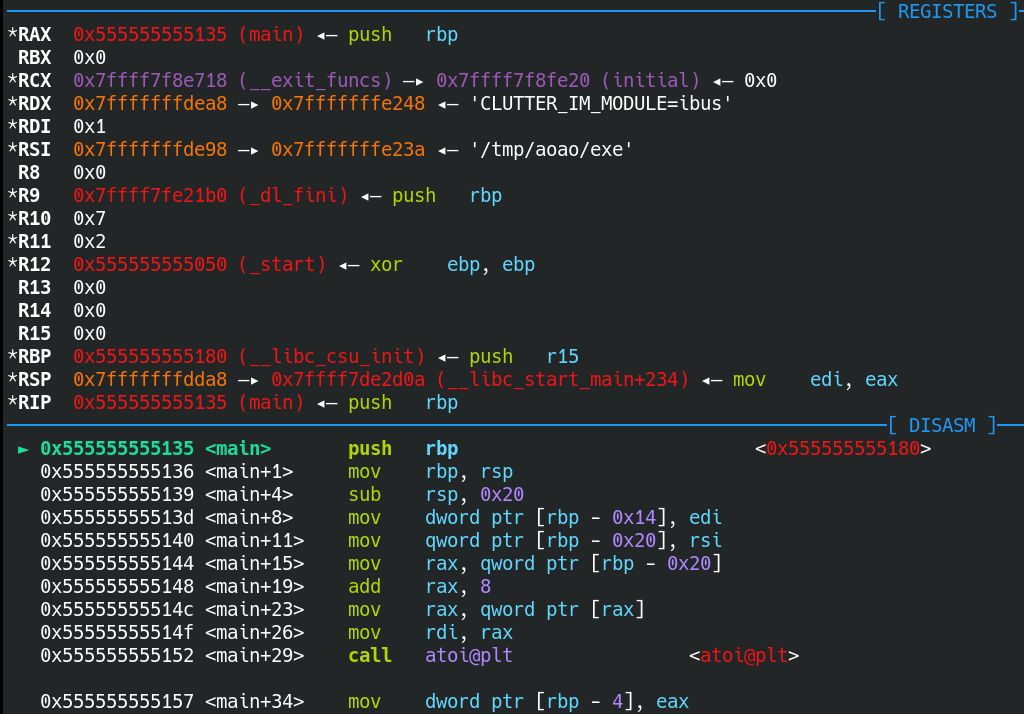
This type of analysis generally makes it possible to confirm what was seen during static analysis, or to understand certain features that could not be analyzed correctly.
For example, the most robust malware often has several layers of obfuscation that slow down and limit our understanding of how it works during static analysis.
For example, some functions will have unreadable decompiled code. In other cases, it may be impossible to decompile the program’s assembly code at all.
Thus, the goal of dynamic analysis is to reproduce the execution environment of the program being studied in order to analyze its behavior as well as possible through the analysis of its execution. This does not only mean using a debugger, but also other monitoring tools to observe created processes, modified files, triggered events…
In reverse engineering, we do not choose either static analysis or dynamic analysis. On the contrary, we generally prefer to combine the two and take advantage of the benefits of each one.
Symbolic execution
Symbolic execution is generally less known and less mastered by the general public. To understand how it works and why it is useful, let’s go back to the previous program:
1
2
3
4
5
6
7
8
9
10
11
12
13
14
15
#include "stdlib.h"

int main(int argc, char *argv[])
{
    int arg = atoi(argv[1]);

    if (arg == 0xdeadbeef)
    {
        return 1337;
    }
    else
    {
        return -1;
    }
}
The program’s behavior is quite trivial: the program retrieves the first parameter entered by the user and compares it to 0xdeadbeef.
If the values are identical, the returned value is 1337; otherwise, it is -1. At this stage, static analysis already allows us to find the correct value to enter. Still, let’s try to find the right input so that the return value is 1337 using angr.
First, create a file named “example_1.c” containing the previous program. Then compile it with the command: gcc -no-pie example_1.c -o example_1.
The
-no-pieoption means that the program instructions will always be loaded at the same address and will not be fully subject to ASLR. This way, angr will not ask us to specify a base address, which is more convenient for us.
Let’s open the freshly compiled example_1 program with IDA (IDA Free will do the job ;) ):
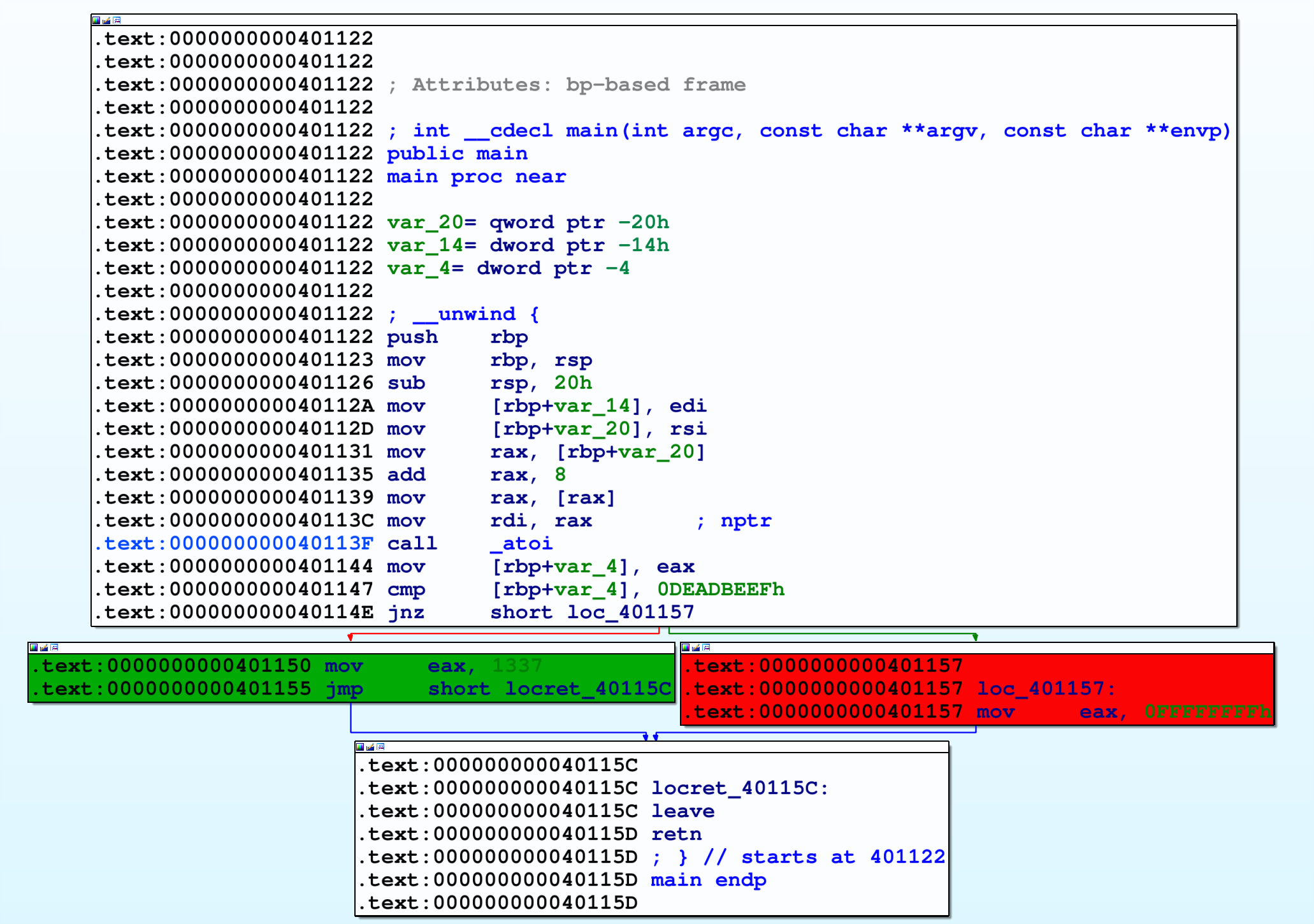
In the end, nothing surprising: we do find the two code blocks, one when the comparison succeeds in green, the other when the comparison fails in red.
Before going further, we need to become familiar with a few crucial notions when dealing with symbolic execution.
States
The notion of state in symbolic execution is very important. By understanding how state management works, we understand how symbolic execution works. Likewise, disastrous state management greatly limits the power we can get from symbolic execution.
A state in symbolic execution is the context in which the program is currently being executed. A context is therefore fully determined by the values of its registers and the different assigned memory areas. Thus, two states are different if and only if they have at least one register, one area with a different value, or variables with different constraints.
A state is a bit like what is displayed in the previous gdb screenshot in the “Dynamic analysis” section, with the different values of the registers, memory, and so on.
angr subdivides the current state when it encounters a branch toward two different paths, each with its own constraint. For example, when our initial state reaches the instruction 0x40114E : jnz 0x401157, two cases are possible:
- Either
[rbp+var_4] == 0xDEADBEEF - Or
[rbp+var_4] != 0xDEADBEEF
The addresses used in this tutorial may not match the “example_1” program if you compiled it on your machine.
You only need to adapt the script by modifying the different addresses using the screenshots in this tutorial so that they match the addresses used by your program.
Thus, there is a constraint on the value contained at [rbp+var_4] that differs depending on the path taken. What will angr do in this case? It is very simple. It will take the initial state state_0 and make two “copies” of this state; let’s name them state_green and state_red.
The two differences between state_green and state_red are the following:
state_green:- The
RIPregister is0x401150 - The state has the constraint:
[rbp+var_4] == 0xDEADBEEF
- The
state_red:- The
RIPregister is0x401157 - The state has the constraint:
[rbp+var_4] != 0xDEADBEEF
- The
Beyond these two differences, the other registers and memory areas of these two substates are the same. Managing several states simultaneously is what makes symbolic execution powerful, because it allows us to cover much more code than with a simple execution of the program.
Paradoxically, the subdivision into several states is also what makes symbolic execution weak: the more branches there are in a program, the more states there are to manage, and the more RAM it consumes. Thus, in a program that performs a large number of loops or contains loops inside loops, memory can quickly become saturated and crash symbolic execution. Later on, we will make an example of a program that causes a path explosion.
Here is roughly the content of the three previous states:
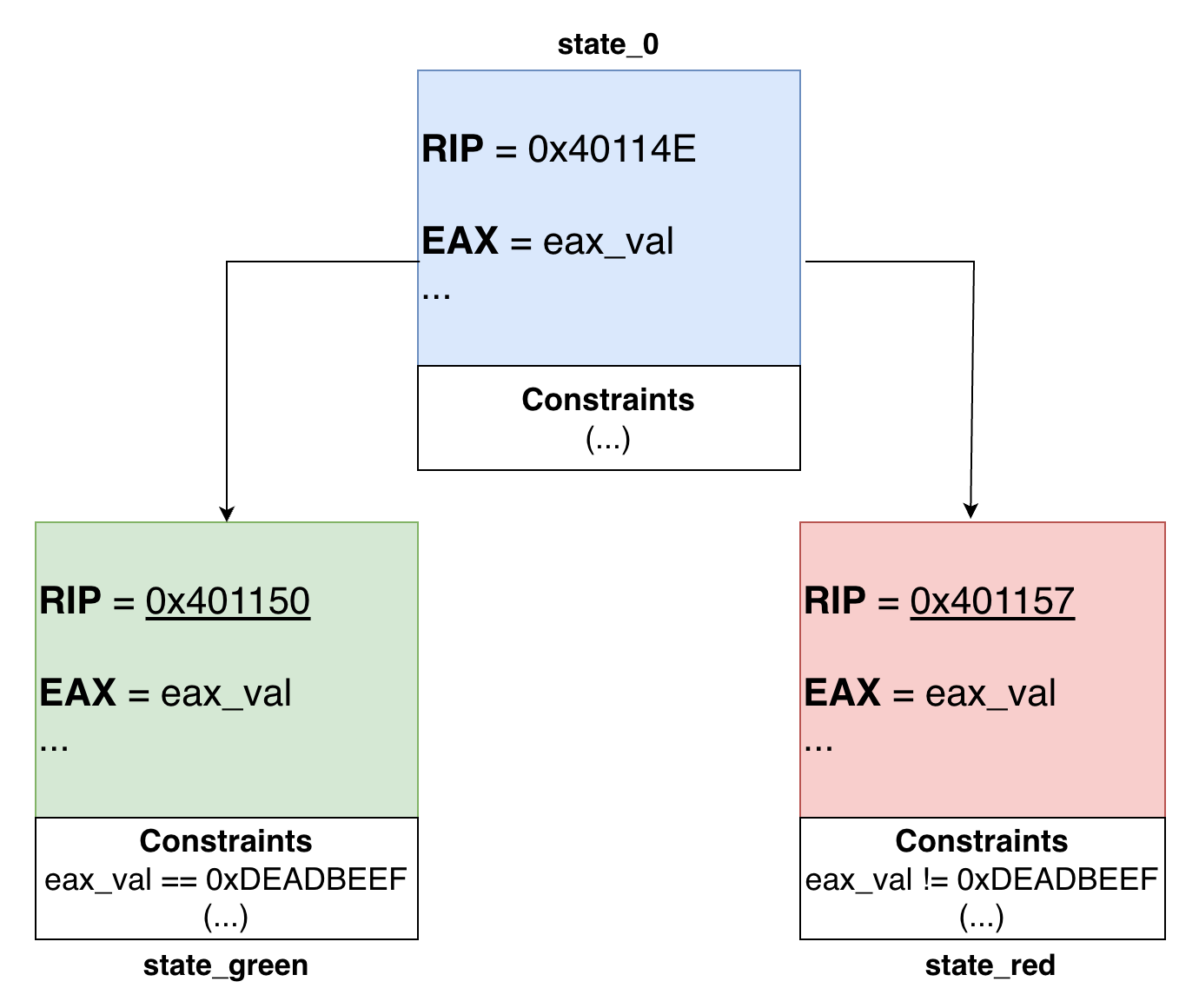
But the constraint was on
[rbp+var_4], why is it now oneax_val?
True, the constraint applies to the value contained at [rbp+var_4], but which variable is the source of [rbp+var_4]?
If we look a few instructions above, we see: 0x401144 : mov [rbp+var_4], eax, where eax is the return value of atoi. Thus, putting a constraint on [rbp+var_4] amounts to putting a constraint on the content of eax at the output of atoi, which we name eax_val.
eax_val is a symbolic variable, and the constraint will be established on it.
Symbolic variables
Another important notion in symbolic execution is the notion of symbolic variables. In fact, for a symbolic execution engine to be able to explore several paths through several states simultaneously, some variables must be symbolic.
Unlike variables with concrete values, symbolic variables can initially have any value. Constraints will only be added to the symbolic variable as the program executes and as paths are chosen at if / else branches.
Imagine that eax_val has a concrete value when atoi returns, for example 0xcafebabe. It will not be possible to impose constraints on eax_val, because the variable already has the following constraint: eax_val == 0xcafebabe.
Thus, initially, a symbolic variable can have any value depending on its type.
For example:
- an 8-bit variable will initially have a value between 0x00 and 0xff (255)
- a 32-bit variable will initially have a value between 0x00 and 0xffffffff (4294967295)
Constraints of a symbolic variable
Generally, a symbolic variable will undergo several constraints throughout execution and along the path taken by the symbolic execution engine. There are then three possible cases for this variable once execution has stopped after following a certain path:
- There is a unique solution: Given the constraints on the variable, there can only be one valid solution.
- There are several possible solutions: For example, the followed path can only be taken if the length of the string, which is a symbolic value, is strictly positive.
- There is no possible solution: This can happen when several constraints cannot be satisfied at the same time. For example, if one constraint is
var >= 10and the other isvar < 8, there is no possible solution.
Actually, angr does not determine by itself whether at least one or several solutions are possible. It relies on what is called an SMT solver. This is a tool that takes as input a set of logical formulas specifying constraints on variables and returns a result, if possible.
Just because a problem is satisfiable does not mean the solver will easily return a solution. Some constraints on a variable can be so heavy and complex that it will take minutes or even hours before finding a result.
Among the best-known SMT solvers are: Z3, Boolector, Bitwuzla …
As for angr, it uses Z3 as its solver.
The Z3 SMT solver
An SMT solver (Satisfiability Modulo Theories), such as Z3, is a software tool that can solve satisfiability problems. It is used to check whether a certain logical formula with combinations of constraints is satisfiable or not.
What is even more impressive with a solver is that, when at least one solution exists, it often manages to return a solution to us. In cases where the formula is really very complicated and the machine being used is not very powerful, there may be a timeout without finding a solution.
Let’s take a concrete example where we will ask z3 to solve two equations:
- One with several possible solutions
- One with no solution
1
2
3
4
5
6
7
8
9
10
11
12
13
14
15
16
17
18
19
20
21
from z3 import *

# Create the variable x
x = Int('x')
# Create the equation
equation = x - 7 >= 2
# Create the Z3 solver
solver = Solver()
# Add the equation to the solver
solver.add(equation)

# Run the solver
if solver.check() == sat:
	# If a solution is found, display the value of x that satisfies the equation
	model = solver.model()
	solution = model[x]
	print("One solution to the equation is: x =", solution)

else:
	# If no solution is found
	print("No solution found.")
By running this python script, one possible output is One solution to the equation is: x = 9, which is indeed a solution to the equation x - 7 >= 2, where x is an integer.
Now, let’s add another constraint with the following two lines below solver = Solver():
1
2
equation_2 = x < 0
solver.add(equation_2)
Since the constraints on x are not satisfiable, running the script returns No solution found.. The idea is not to know how to use z3 in an advanced way (angr will do that for us 🤭), but to understand what a solver is for and how to use one.
Using angr
We have talked about the main theoretical elements related to symbolic execution: symbolic variable, state, constraints, solver, and so on. Let’s move on to the practical part with this example.
The overall idea is to ask angr to execute the main function and go through the green block so that it gives us the correct input to get there.
Here is the beginning of the script that uses angr and allows us to do that (I use the same addresses as the ones we saw previously):
1
2
3
4
5
6
7
8
9
import angr

p = angr.Project("./example_1")
state_0 = p.factory.blank_state(addr= 0x401122)

sm = p.factory.simulation_manager(state_0)

print("[+] Exploration in progress ....")
sm.explore( find = 0x401150, avoid = 0x401157)
Let’s break down this script together:
p = angr.Project("./example_1")creates an “angr” project by specifying the program we want to usestate_0 = p.factory.blank_state(addr= 0x401122): we create an initial “empty” state that starts at the first instruction ofmainat address0x401122.- Once our initial state
state_0is created, we will need to create the simulation_manager. This is an object that will manage all states during symbolic execution. At the beginning, there is only one state, the one we just created. However, when angr encounters branches, for example during an “if-else”, it will “subdivide” the current state into two “substates”, each taking respectively the “if” path and the “else” path. - Then, we ask the simulation_manager to reach the “green” block, where the comparison with
0xdeadbeefsucceeds, by specifyingfind, and to avoid the red block, where the comparison failed, by specifyingavoid.
The Simulation Manager
This is the big “thing” that will manage all our states during symbolic execution. At a given point in symbolic execution, states can have different statuses:
- active: An active state represents an execution path currently being explored by angr. This means that angr is symbolically executing instructions for this specific path;
- inactive: An inactive state is an execution path that has been fully explored. This can happen when all program instructions have been followed for this specific path, or when it is a reached destination; angr no longer needs to process it;
- found: When angr reaches a “found” state, it means that the execution path satisfies a specific condition defined by the user. For example, this can be the case when the program reaches a certain address, when it reaches a specific function, or when another defined condition is satisfied;
- avoid: In the same way that a found state means we have reached code whose context satisfies certain conditions, an avoid state is a state where we want program execution to stop;
- unsat: An “unsat” (unsatisfiable) state is an execution path that leads to a contradiction or to a condition impossible to satisfy. This generally happens when an invalid program condition is encountered, meaning that angr cannot explore this execution path any further.
Here is an example where the SM (Simulation Manager) contains only two states:
- a found state 🟢
- an avoid state 🔴

First execution of the script
We run the previous script with python3 angr_explore.py and then, well, nothing! The script does not seem to do much… You will notice that angr is not very happy and lets you know through several warnings. Some are harmless (and we will see why later), but there is one that comes up often and helps us understand why the script does not do much.
It is this warning:
1
2
WARNING | angr.storage.memory_mixins.default_filler_mixin | Filling memory at 0xfffffffffffffc0b with 1 unconstrained bytes referenced from 0x539
fa0 (atoi+0x0 in libc.so.6 (0x39fa0))
Well, it looks like complete gibberish to us, but let’s still try to understand the logic behind it. In any case, from what we can see, there seems to be a small issue at this address: (atoi+0x0 in libc.so.6 (0x39fa0)).
From the very first instructions of the atoi function, angr is lost. This is actually normal. Indeed, atoi is an imported function. It is therefore executed dynamically by the program by calling the standard libc library.
Since angr does not execute anything dynamically, it does not even load libc when the application starts. We will therefore have to handle the call to atoi so that it no longer bothers us later.
In reality, angr handles some basic libc functions rather well. But sometimes it is better to take the reins so we know exactly what is being done.
Adding a hook
There are different ways to handle or bypass a function call (or an instruction in general) ourselves. The simplest is using hooks, and that is the one we will use. There is another, more advanced way to create hooks via SimProcedure (see the SimProcedures).
Here is how to implement a hook in angr:
1
2
3
4
5
6
7
8
9
10
11
12
13
14
15
import angr

def hook_atoi(state):
	# Do stuff
	return

p = angr.Project("./example_1")
# Do not forget to adapt this depending on your addresses
state_0 = p.factory.blank_state(addr= 0x401122)

sm = p.factory.simulation_manager(state_0)
p.hook(0x40113f, hook_atoi,5)

print("[+] Exploration in progress ....")
sm.explore( find = 0x401150, avoid = 0x401157)
This happens in two steps:
- Call angr’s
hookfunction on the project with three arguments:- The address of the instruction whose behavior we want to intercept or modify
- the python function that will be executed instead
- the total size of the instruction (or instructions) to hook, here, 5 bytes:

- Define the function that will be called during the hook. Depending on the hooked instructions or functions, its content won’t be the same. For example, if we hook the
printffunction, the hook function could simply display a string on the screen withprintin python.

In the executed code, angr will behave as follows:
- When arriving at address
0x40113f, it realizes that 5 bytes starting from this address must be hooked and will therefore be handled by our script. This corresponds exactly to thecall _atoiinstruction - The Python hook
hook_atoiis then executed instead of the instruction - Once the
hook_atoifunction is finished, angr resumes symbolic execution 5 bytes later
What is interesting with hook functions is that they can take, as a parameter, the current state (here state) when the hook was triggered. This is extremely practical for checking register values, modifying them, inspecting memory, the stack, and so on.
For now, the hook function is empty; it does nothing. Let’s fill it in ✏️!
We know that the atoi function converts a string into an integer. What we could have done to keep the same behavior as atoi is use Python’s argv variable to return an arbitrary integer, chosen when launching the script.
But that is not what we are going to do. Let’s remember the objective we want to achieve with symbolic execution: Find the right argument to give the program so that it returns 1337.
Using a symbolic variable
Thus, our argv[1] argument must not be concrete, but symbolic. We must put the return value in the rax register, since that is the register that contains the value returned by a function in x86_64.
1
2
3
4
5
6
7
8
9
10
11
12
13
14
15
16
17
18
19
20
21
22
import angr
import claripy

# 64-bit symbolic variable
arg_symb = claripy.BVS('argv', 8*8)

def hook_atoi(state):
	print("[i] The atoi function has been hooked")
	# We return the symbolic variable via rax
	state.regs.rax = arg_symb

p = angr.Project("./example_1")
state_0 = p.factory.blank_state(addr= 0x401122)

sm = p.factory.simulation_manager(state_0)
p.hook(0x40113f, hook_atoi,5)

print("[+] Exploration in progress ....")
sm.explore( find = 0x401150, avoid = 0x401157)
print("[+] Arrived at destination")

print("[+] Explored paths: ",sm)
By running this version of the script, after a few warnings, we get:
1
2
3
[i] The atoi function has been hooked
[+] Arrived at destination
[+] Explored paths:  <SimulationManager with 1 found, 1 avoid>
Everything went as planned and angr was able to explore two paths in total:
found, which groups the states from explored paths that were able to reach the set objective, here:0x401150(there can be severalfound; in our case, there is only one)avoid, which groups the states from explored paths that must stop if they encounter anavoidaddress, here:0x401157(in our case, there is only one)
Let’s go through a few explanations about the symbolic variable arg_symb. First, we imported the claripy module, which is a module used by angr to manage symbolic and concrete variables as well as the use of the z3 solver.
The two types of variables can be declared this way:
- Concrete variables (e.g.
var = claripy.BVV(0xdeadbeef, 8*4)): to declare a concrete variable, two arguments must be provided:- Its value
- Its size (in bits! and not in bytes, be careful!), in this example, the variable is 32 bits (4 bytes)
- Symbolic variables (e.g.
var_symb = claripy.BVS('x', 8)): to declare a symbolic variable, two arguments must also be provided:- The name of the symbolic variable
- Its size (here 1 byte, useful to represent, for example, a variable of type
char)
I insist: the size specified when creating symbolic variables with
BVSor concrete variables withBVVusing claripy is in BITS!
Here, the symbolic variable we use is named arg_symb (or argv from claripy’s point of view) and it has a size of 8 bytes (64 bits). We use it during the atoi hook in order to return it (via rax).
From now on, angr knows that the return value is symbolic, so the comparison with 0xdeadbeef can either fail or succeed here:

If we wanted to optimize the script, we could have returned only a 32-bit value via
eax, since only the first 4 bytes ofraxare used for the comparison.
But wait, you didn’t tell us why there is a bunch of warning messages 😵💫?
In fact, the various warnings that we have not dealt with concern memory areas that we did not initialize and that are manipulated by the program. For example, the first instructions of the main function are:
1
2
0000000000401122   push    rbp
0000000000401123   mov     rbp, rsp
Thus, from the very first instruction, angr, which symbolically executes the instructions, must execute push rbp.
So, two things need to be done:
- Retrieve the value of
rbp - Put it on the stack
The problem is that angr does not know the value of rbp, nor which memory area is the stack. Indeed, we did not specify any of these values, so they are considered unconstrained by default!
What angr does when displaying a message of this type:
1
WARNING | Filling register rbp with 8 unconstrained bytes referenced from 0x401122 (main+0x0 in example_1 (0x401122))
is that it “fills” rbp with unconstrained values so that it can “execute” the push rbp instruction while having some value to put on the stack. Same thing for the stack address.
If we absolutely wanted to give a value to rsp and rbp, we could do something like this:
1
2
3
state_0 = p.factory.blank_state(addr= 0x401122)
state_0.regs.rsp = 0x7fffff0000
state_0.regs.rbp = 0x7fffff0008
This can be useful when we absolutely want to have the same memory addresses as those displayed by a debugger during dynamic analysis / execution.
Retrieving the valid input
We managed to make angr reach the address of the block where the comparison is performed correctly. However, angr has not told us which valid input allowed it to get there. Don’t worry, we are almost there 😅!
As a reminder, the simulation manager sm was able to have at least one found state. Now we just need to:
- place ourselves (or switch) into the context of the state that arrived in the “green” block (this is the only state present in
sm.found) - call the solver so that it returns a value of
arg_symbthat allowed this state to arrive in the block we are interested in - display that value!
Here is the final script:
1
2
3
4
5
6
7
8
9
10
11
12
13
14
15
16
17
18
19
20
21
22
23
24
25
26
27
28
29
30
31
32
import angr
import claripy

# 64-bit symbolic variable
arg_symb = claripy.BVS('argv[1]', 8*8)

def hook_atoi(state):
	print("[i] The atoi function has been hooked")
	# We return the symbolic variable via rax
	state.regs.rax = arg_symb

p = angr.Project("./example_1")
state_0 = p.factory.blank_state(addr= 0x401122)

sm = p.factory.simulation_manager(state_0)
p.hook(0x40113f, hook_atoi,5)

print("[+] Exploration in progress ....")
sm.explore( find = 0x401150, avoid = 0x401157)
print("[+] Arrived at destination")

if len(sm.found) == 0:
	print("[-] It was not possible to reach the destination")
	quit()
else :
	print("[+] Determining the valid input")

	# Retrieve the state that arrived in the correct block
	found = sm.found[0]
	# Call the solver to return at least one solution
	res = found.solver.eval(arg_symb)
	print("[+] A correct input is: ",hex(res))
By running this script, we do get the correct input!
1
2
3
4
5
[+] Exploration in progress ....
[i] The atoi function has been hooked
[+] Arrived at destination
[+] Determining the valid input
[+] A correct input is:  0xdeadbeef
Now, let’s explain the different steps:
- First, we check that there is at least one state that reached the destination (green block); otherwise, we quit
- If everything is ok, we retrieve the first
foundstate (here there is only one, but sometimes there can be several) - We call the solver of our
foundstate viafound.solver.eval. The two possible parameters are:- The symbolic variable for which we want at least one possible value
- The format of the final result (optional), for example:
cast_to=bytesto get bytes as output. In our case, an integer will do.
- Displaying the correct input
How does the solver manage to find the correct input?
Since we have seen, in broad terms, how a solver works, it will be easier to understand how angr manages to find the correct input.
First, remember that we declared the symbolic variable representing the input like this: arg_symb = claripy.BVS('argv[1]', 8*8). At this stage, arg_symb has no constraints and can therefore take any 64-bit value.
However, during program execution, this symbolic variable will be subject to one or more constraints that will be automatically added by angr.
For example, when atoi returns, the rax register contains our symbolic variable arg_symb. But a comparison is then immediately performed:
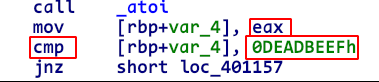
Thus, for the jnz instruction not to be executed and for us to go directly into the “green” block, the following condition must be true: eax == 0xdeadbeef. Now, eax contains the 32 least significant bits of arg_symb.
In this way, angr automatically adds a constraint of the form arg_symb[32:64] == 0xdeadbeef.
Since the comparison is performed on 32 bits via
eax, there is no constraint on the 32 most significant bits ofrax.
Practice
Here is a small, fairly simple program that takes a hexadecimal string and checks whether it is the right key.
A few differences from the program we studied should be noted:
- The input is no longer retrieved via
argv - Several libc functions have been added (hook them?)
The goal of this challenge is not to become an angr pro, but to know how to use angr’s basic features.
1
2
3
4
5
6
7
8
9
10
11
12
13
14
15
16
17
18
19
20
21
22
23
24
25
26
27
28
29
30
31
32
33
34
35
36
37
38
39
40
41
42
43
44
45
46
47
#include "stdio.h"
#include "stdlib.h"
#include "string.h"

unsigned long long hash(unsigned long long arg)
{
  unsigned long long result = 0;
  unsigned char x =0;
  unsigned long long temp =0;

  unsigned long long key =0xef9e8bd8f3afe9eb;
  for (int i =0;i<8;i++)
  {
    x = (arg >> (i*8)) &0xff;
    switch(x % 2)
    {
            case 0:
                temp = 0xff;
                break;
            case 1:
                temp = x ^ (unsigned char)((key >> (i*8)) &0xff);
                break;

      }

      result = result | (temp << (i*8));
  }
    return result;
}
int main()
{
    char key_buffer[16] = {0};
    puts("Give me the key in hexadecimal: ");
    read(0,key_buffer,16);
    unsigned long long arg = strtoull(key_buffer,NULL,16);
    if (hash(arg) == 0xdeadbeefcafebabe)
    {
      puts("Win !");
      return 1337;
    }
    else
    {
      puts("Lose !");
      return -1;
    }
}
To compile it: gcc -no-pie main.c -o exe.
Summary
During this chapter, we saw several points together:
- A reminder of what static analysis and symbolic analysis are
- States are symbolic execution contexts that make it possible to explore several paths during a single symbolic execution. States mainly differ by the constraints applied to their variables
- Constraints make it possible to restrict the value that a symbolic variable can have
- The SMT solver makes it possible to prove that an equation has one solution, several solutions, or none. These equations are built from constraints on variables